
Text effects are powerful. They can change the entire mood of a design, making it hot, cold, dramatic, mysterious, or even magical. If you want to create something cool, frosty, and winter-themed, then the Ice Text Generator is the perfect tool for you. With this simple online tool, you can turn your words into crystal-like frozen text images that look stylish, clean, and creative.
The best part?
You don’t need Photoshop, editing skills, or any special software. Everything works directly in your browser. Just type your text, choose your style, and download your icy creation within seconds.
This guide will tell you what the Ice Text Generator is, how it works, where you can use it, and how it compares to the Fire Text Generator.
❄️ What Is an Ice Text Generator?
An Ice Text Generator is an online tool that converts plain text into visually stunning frozen-style lettering. The design looks like it is made from ice, snow, frost, or crystal. These effects are great for winter themes, gaming thumbnails, logos, event posters, and aesthetic designs.
This tool is designed for everyone:
Graphic designers
YouTubers
Gamers
Social media creators
Bloggers
Students
Brand owners
Even if you have never edited a photo before, you can create professional-looking icy text art in less than 10 seconds.
❄️ Why Use Ice Text Effects?
Ice effects instantly create a “cool” environment in your design. They add:
A clean winter vibe
A frosty blue glow
A sharp crystal aesthetic
A premium, elegant look
A calm and peaceful feeling
Frozen text is perfect for anything related to cold, ice, snow, gaming, fantasy, or winter promotions.
❄️ Key Features of the Ice Text Generator
Here are the powerful features that make this tool one of the best:
1. Instant Frozen Effect
Just type your text and instantly turn it into a cool icy image with realistic frost textures.
2. Free to Use
No subscription, no login, no watermark, totally free.
3. High-Quality Output
Download crisp, clear images suitable for:
YouTube thumbnails
Social media
Blogs
Logos
Posters
4. Multiple Icy Styles
Choose from various frozen looks:
Crystal frost
Snowy ice
Blue-glow lettering
Frozen typography
Winter sparkle text
5. Works on All Devices
PC, laptop, mobile, and tablet, everything supported.
6. Super Easy for Beginners
Designed for users who don’t know Photoshop but still want professional results.
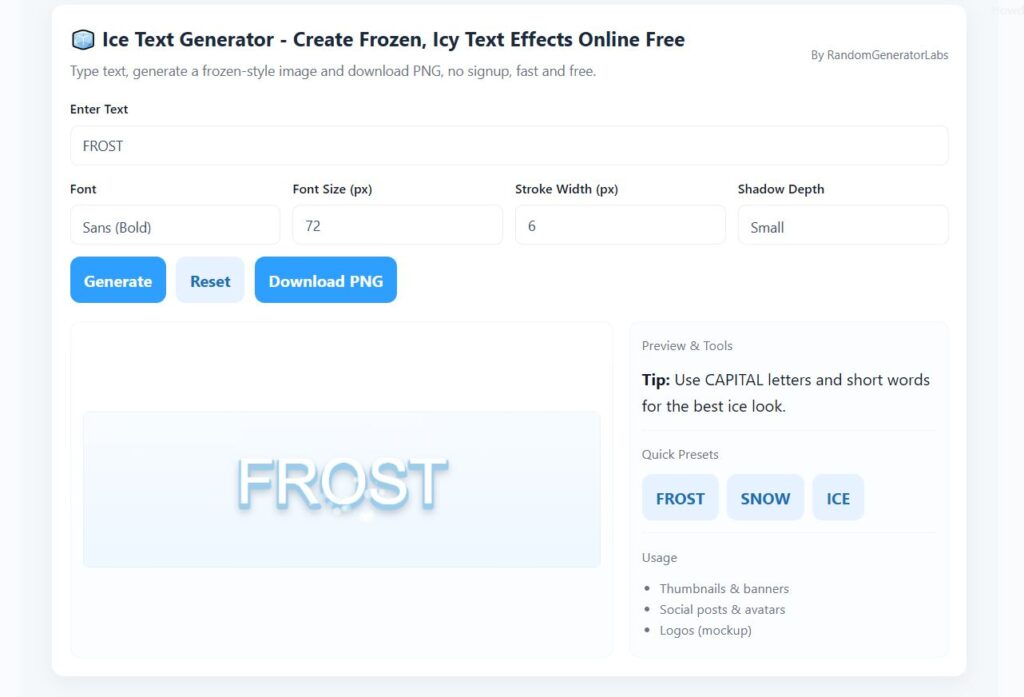
❄️ How to Use the Ice Text Generator (Step-by-Step Guide)
Using the tool is extremely simple. Follow these steps:
Step 1: Enter Your Text
Type any word, name, title, or sentence in the text box.
Step 2: Choose the Style
Pick your favorite frozen theme such as ice shards, crystal frost, or snowy letters.
Step 3: Increase or Decrease Size
Adjust the text size depending on your design.
Step 4: Click Generate
Instant frozen text appears on the screen.
Step 5: Download
Save the image in high-quality PNG format.
That’s it, fast, easy, and beginner-friendly.
❄️ Where Can You Use Frozen Text Effects?
There are many creative uses for ice-themed text:
1. YouTube Thumbnails
Perfect for winter-themed content, gaming, or chill vibes.
2. Gaming Logos
Use it for clan names, avatars, and gamer tags.
3. Event Posters
Great for Christmas, winter festivals, ice skating events, and holiday sales.
4. Social Media Graphics
Make attractive Instagram, Facebook, or TikTok posts.
5. School or College Projects
Create titles for presentations and assignments.
6. Business Branding
Use icy text for winter discount banners and ads.
❄️ Ice Text vs Fire Text – What’s the Difference?
If you already used our
🔥 Try the Hot Version of This Effect
Create blazing, dramatic text effects with our Fire Text Generator, quick, bold, and eye-catching.
In contrast:
🔥 Fire Text Generator
High energy
Bold and powerful
Perfect for action themes
❄️ Ice Text Generator
Calm and cool
Elegant and clean
Best for winter, fantasy, and aesthetic designs
Both tools create powerful emotions, one with heat, the other with cold. Try both and find the perfect balance for your designs.
❄️ Tips to Create Better Frozen Designs
Here are some easy tricks to make your icy text look even better:
Use short words (they look more powerful).
Use CAPITAL letters for a sharp frozen look.
Add dark background images for stronger contrast.
Keep spacing tight to make the letters look like a solid block of ice.
Use blue, white, or black backgrounds, these look best.
These small improvements can instantly boost the output quality.
❄️ Related Posts
- 🔥 Fire Text Generator
- 🧊 Frozen Logo Maker
- 💨 Smoke Text Generator
- 💥 3D Text Generator
- 🎨 Neon Text Generator
- 🧪 Glitch Text Generator
❄️ Frequently Asked Questions (FAQ)
1. Is the Ice Text Generator free?
Yes, the tool is 100% free with no signup required.
2. Can I use the generated text for commercial projects?
Yes, you can use it in logos, banners, ads, and social media designs.
3. Does it work on mobile phones?
Yes, the tool works on Android and iOS browsers.
4. Do I need Photoshop or editing skills?
No, everything is generated automatically.
5. Can I customize the colors?
Depending on the version, you may choose glow intensity, color tones, or background transparency.
❄️ Final Thought
The Ice Text Generator is one of the easiest and fastest ways to create frozen-style text effects online. Whether you’re designing winter promotions, gaming thumbnails, or aesthetic logos, this tool gives you a professional look without any editing skills.
Its clean style, easy interface, and high-quality output make it perfect for designers, content creators, and beginners alike.
Try it today and turn your simple words into cool, frozen artwork instantly!