
🔥 Fire Text Generator
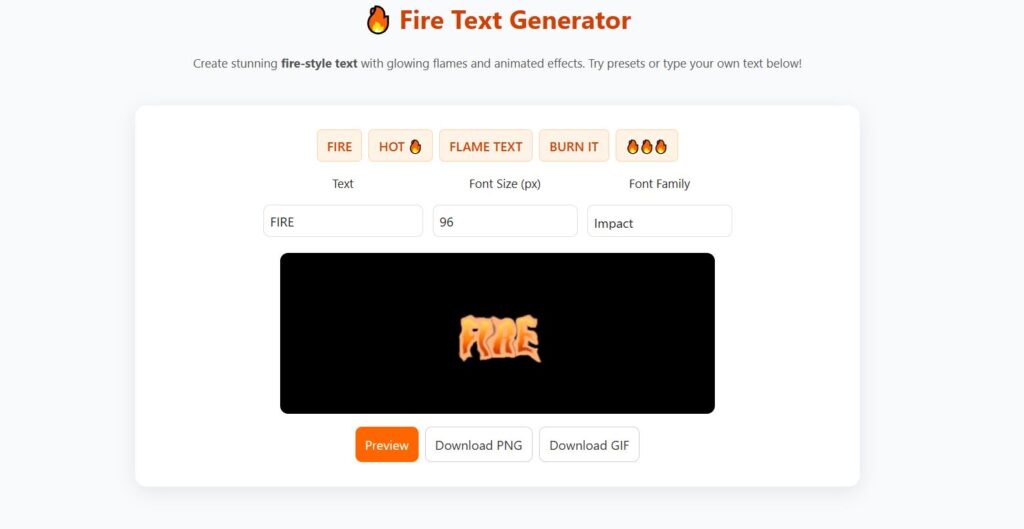
Our Fire Text Generator online free is fast, simple, and works directly in your browser. Just type your text, customize the fire effect, and download your burning text image instantly. Create stunning fire-style text with glowing flames and animated effects. Try presets or type your own text below!
🔥 Fire Text Generator - Create Burning & Flaming Text Online Free
Introduction
With just a few clicks, you can transform any plain word into a blazing masterpiece. This guide will show you how to use a fire text generator effectively, explore its many variations (like flame font generators, burning text makers, and animated fire text generators), and reveal how to create your own fiery word art, completely free.
🔥 What Is a Fire Text Generator?
A Fire Text Generator is a digital tool that lets you apply realistic flame or burning effects to text. Instead of spending hours in Photoshop, you can instantly create flaming fonts, fire writing, or even animated fire gifs online.
These tools combine text rendering with layered flame textures and glow animations to produce effects that look like your words are actually on fire. Some generators even let you customize the flame intensity, background, and color to match your design style.
Whether you want your name written in glowing embers or a blazing slogan for your next meme, a flame text generator makes it effortless.
🔥 Why Fire Text Is So Popular Online
There’s something visually powerful about fire, it symbolizes energy, passion, danger, and transformation. That’s why designers, gamers, and meme creators use fire writing generators and flame text makers to make their text stand out.
Social media posts: A “burning” title catches more attention than flat text.
Gaming logos: The fire effect fits perfectly with intense or battle-themed games.
Memes: A fire text meme is instantly more expressive and funny.
YouTube thumbnails: Flaming text can make a video title look epic.
In short, fire text adds emotion and energy, turning ordinary words into visual impact.
🔥 Top Features of the Best Fire Text Makers
Modern fire text generators come with powerful customization features. Here’s what the best ones usually offer:
1. Realistic Flame Effects
The best flame text generators use high-quality textures and gradient overlays to make flames look natural, from glowing orange to hot white centers.
2. Animated Fire Text (GIF Support)
Some tools double as fire text gif generators or fire gif makers, letting you export your design as a moving animation, perfect for Discord, TikTok, or social posts.
3. Custom Fonts & Styles
Want gothic letters, cursive writing, or bold fonts? Many fire font generators and flame writing tools allow font uploads and custom choices.
4. Adjustable Intensity
You can increase or soften the flames, add glowing sparks, or even switch to smoke effects for a “burned-out” look.
5. One-Click Download
Most tools let you save your fire art instantly in PNG, JPG, or GIF format.
🔥 How to Create Fire Text Online (Step-by-Step)
You don’t need graphic design experience to create your own burning font effect. Just follow these easy steps:
Step 1: Open a Fire Text Generator
Visit any trusted site like Random Generator Labs or another online text effect tool that offers flame text or fire font options.
Step 2: Enter Your Text
Type the word or phrase you want to ignite. Keep it short for the best visual results (e.g., BURN, FLAME, HOT).
Step 3: Choose a Font Style
Select a font that suits your theme, gothic, bold, or handwritten fonts work especially well for fire letters.
Step 4: Apply the Fire Effect
Click “Generate” or “Apply Effect.” The tool will automatically render flaming fonts with glowing edges and moving sparks.
Step 5: Download Your Burning Text
Once satisfied, click “Download.” You can choose a static image or an animated GIF if supported.
That’s it! In less than a minute, you can make your text look like it’s blazing off the screen.
🔥 Why Use Our Fire Text Generator Online?
✔ 100% Free to use
✔ No registration required
✔ Fast & browser-based
✔ High-quality fire text output
✔ Works on mobile & desktop
Unlike other tools, our fire font generator focuses on speed, quality, and simplicity.
🔥 Fire Text Generator Variations You Should Try
Not all fire text tools are the same, here are some specialized types worth exploring:
🔹 Flame Text Generator
Focuses on realistic flame overlays, perfect for bold headings and title banners.
🔹 Fire Font Generator
Emphasizes typography; lets you choose from different fire fonts or upload your own.
🔹 Burning Font Generator
Simulates letters that appear charred or glowing red, ideal for dramatic effects.
🔹 Fire Writing Generator
Looks like handwriting set ablaze, often used for fantasy or magical text designs.
🔹 Animated Fire Text Generator
Adds motion to your design, flickering flames and glowing embers that move realistically.
Each one brings a unique style and use case, depending on your project.
🔥 Best Uses of Fire Text Generator
This flame text generator online is perfect for many creative needs:
🎮 Gaming usernames & clan names
🎥 YouTube thumbnails & banners
🧠 Logos & branding designs
📱 Instagram & social media posts
🖼 Posters, flyers & digital art
Fire text grabs attention instantly and boosts engagement.
🔥 Using Fire Text in Memes and Art
A growing trend is creating fire text memes, short, humorous, or impactful images featuring flaming captions. These memes often exaggerate emotions or hype up moments in online conversations.
Example ideas:
“This song is 🔥”, with the word FIRE in animated flames.
“My reaction when the Wi-Fi finally connects.”
Gaming intros with blazing usernames.
You can also use fire word art in posters, advertisements, or wallpapers to create a dramatic focal point.
🔥 Fire Text for Gaming Logos and Titles
Many gamers use fire words generators and flaming font makers to build bold, intimidating logos. Imagine your clan or streamer name blazing in orange and red, it adds instant intensity.
Pair fire text fonts with black or dark backgrounds for the strongest contrast. You can also add smoke or sparks for extra depth.
Pro tip: If your game or brand name has themes like power, battle, energy, or revenge, a fire text effect fits perfectly.
🔥 Fire Text vs Flame Text vs Burning Text
Although these terms are often used interchangeably, each has subtle differences:
| Term | Description | Best Use |
|---|---|---|
| Fire Text | A broad term for glowing, blazing letters | General effects, memes |
| Flame Text | Emphasizes realistic flame graphics | Professional banners, designs |
| Burning Text | Looks like charred or embered letters | Horror, thriller, or metal art styles |
Using different variations (like firey text, flame font generator, or flaming font generator) helps you reach more audiences via SEO and keyword diversity.
🔥 Animated Fire Text & GIF Generators
If static text isn’t enough, you can make your design move and flicker. Tools like fire text gif makers and animated fire text generators let you export your art as a GIF or video loop.
Benefits of Animated Fire Text:
Works perfectly for intros, banners, or YouTube thumbnails.
Adds energy and motion, making your text feel alive.
Ideal for sharing on platforms like Discord, Reddit, or Instagram Stories.
To make your own:
Use a fire gif maker tool.
Type your text and choose flame animation style.
Preview the animation.
Download as a looping GIF.
Animated text is one of the most shareable formats online, lightweight, flashy, and visually striking.
🔥 Tips for Designing with Fire Fonts
When working with fire text fonts or flame letters, keep these design tips in mind:
Use dark backgrounds, flames pop best against black or deep blue.
Avoid too much detail, short, bold words look cleaner.
Combine effects, add smoke or sparks for realism.
Use gradient overlays, from red to orange to yellow.
Keep legibility, make sure letters remain readable even with heavy flame textures.
With balance, your fire font generator results can look professional, not chaotic.
🔥 Fire Fonts & Word Art Inspiration
You can experiment with many flaming fonts and fire word art ideas:
Gothic or medieval fire writing for fantasy logos
Cartoon fire letters for memes
Metallic + flame combo for tech or racing themes
Glowing ember text for Halloween or dark themes
Each style can be created using variations of a flaming font generator or fire words generator online.
🔥 Advanced Uses: Custom Flame Letters Generator
If you’re an artist or developer, you can go a step further by using a flame letters generator that outputs vector flames or CSS-based animations. These allow integration into websites or apps where the fire effect responds dynamically (like flickering on hover).
For developers, such features open doors for:
Interactive banner designs
Animated typography for landing pages
Fire-themed event promotions
🔥 Create Fire Text Instantly, Free Online
If you’re ready to try it yourself, head over to Random Generator Labs, where you’ll find free and easy-to-use creative tools, including a Fire Text Generator that lets you design, preview, and download your flaming text instantly.
Whether you’re making a meme, a game logo, or a banner, you’ll love how quickly it transforms plain text into fiery art.
🔥 Fire Text Styles You Can Create
With our Fire Text Generator, you can generate multiple fire effects, including:
🔥 Burning fire text
🔥 Flaming text effect
🔥 Glowing fire font
🔥 3D fire text
🔥 Neon fire & flame text
Each style is optimized for high visibility and strong visual impact.
FAQs
1: What is a Fire Text Generator?
A Fire Text Generator is an online tool that creates realistic flaming text effects, letting you turn any word or phrase into fiery artwork in seconds.
2: How can I create burning text online?
You can make burning text easily using a fire text maker or flame font generator, just enter your text, choose a font, and apply the fire effect.
3: Is the Fire Text Generator free to use?
Yes, most fire text generators are completely free and don’t require downloads or registration. You can create fire fonts and save them instantly.
4: Can I make animated fire text or GIFs?
Absolutely! Use an animated fire text generator or fire text GIF maker to produce moving, flickering flame effects for memes and social posts.
5: What is the difference between Fire Text and Flame Text?
Fire text refers to glowing, burning letters, while flame text focuses on realistic flame visuals. Both can be made using a flame text generator.
6: Which fonts work best for fire effects?
Bold or gothic fonts look best in a fire font generator because they show more texture and flame detail, making the burning font effect stand out.
7: Can I use Fire Text for memes or logos?
Yes! Many creators use fire text memes or flame writing in gaming logos, banners, and social media posts to add energy and attention-grabbing visuals.
8: Do Fire Text Generators support transparent backgrounds?
Most flame letters generators offer transparent PNG downloads, allowing you to overlay your fire writing generator results on any background.
9: How do I make Fire Word Art?
Use a fire words generator to design artistic flaming text. Customize the color, intensity, and glow to create unique fire word art for posters or digital art.
10: Where can I try a Fire Text Generator online?
You can create amazing flame and burning text effects for free using the Fire Text Generator tool available at Random Generator Labs.
🧩 Related Posts
🔥 Final Thoughts
Fire text effects will never go out of style, they combine energy, emotion, and creativity all in one spark. A Fire Text Generator allows anyone, regardless of design skills, to create professional-looking flame text, burning fonts, or animated fire gifs in seconds.
By experimenting with different fire font generators, flame text makers, and fire gif creators, you can produce visuals that are not only attention-grabbing but also uniquely yours.
So the next time you want to make your words burn with style, open your favorite fire text generator, ignite your creativity, and let the flames do the talking.